Frame Basic Accounting Settings
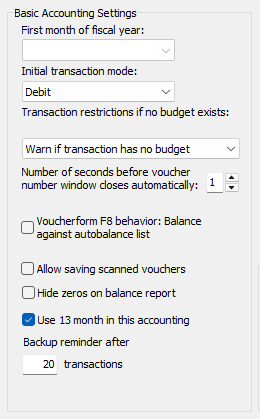
First month of fiscal year (now disabled)
Now this setting is defined and fixed in your License. When purchasing your license, you have the possibility to select a 'non-standard' fiscal year period, like from July to June. Remember that this may not be changed after the first voucher has been registered.
Initial transaction mode
If you mostly register purchases in your accounting you may want to set the amount type to 'Debit' as you normally register your cost account first and then balance against cash or bank. On the contrary if most of your transactions are for Incomes, you may select 'Credit' here.
Transactions restrictions if no budget exists
Normally you will set this to 'Deny transactions with no budget' because otherwise users may post transactions whose amounts will only appear in unfiltered budget reports (reports for ALL transactions). If you don't use NXAccounts' budget feature you should set this to 'Allow transactions with no budget'.
Number of seconds before new voucher number window closes automatically
As NXAccounts may also (optionally) be used in networking version, then two accountants may post vouchers at the same time. Hence they don't know what 'their' next voucher number will be until their voucher is actually posted. Because of this we use a popup window to display the saved voucher number for a short time. Personally I set this value to one second as I normally also can see the last voucher number in my transaction list below the Edit Voucher window.
Allow saving scanned vouchers
If you want to save digital copies of your accounting vouchers you may check this box. Importing scanned voucher files is done from Tables / Transactions list's Scanned voucher button. Accepted file types are image files and PDF. NOTE: This function requires a lot of disk space, so consider if you really need this...
Hide zeros on balance reports
If you tick this box then zero value amounts (0.00) will not be printed on Balance Reports.
Use 13th month in accounting
Some of our customers prefer to post 'annual settlement dispositions' in a separate period, apart from 'normal' vouchers for the fiscal year. If you need this 'feature', please tick this box.
Backup reminder
Everyone needs to be reminded when Backups are needed. Here you may define how many new vouchers you can add between those Backup reminders. If you fail doing regular backups, you may have to re-register a huge number of vouchers when you find yourself in a situation needing to restore your accounting from a backup,
Return to parent Accounts Settings