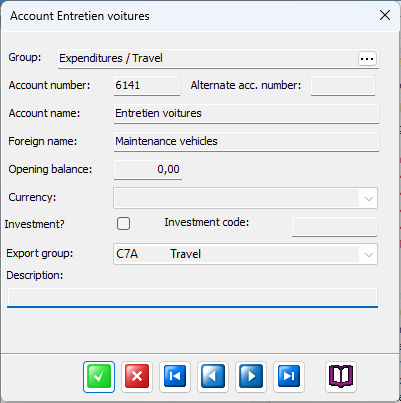
Account group
This is the account group into which this account's transaction amounts will be accumulated. If you select a balance account group (red color i tree view) this account will become a Balance account (normally red color), otherwise it will be a Result account (which always reset their opening balance at the start of each fiscal year).
Account number
The number of digits of your mainbook accounts are defined in your license, you can check all your numbering masks, languages and other stuff in Settings / App and License data tab.
Alternative number
If you are reporting to an overseas fundraiser or donor, chances are they are using another account plan numbering scheme that you do. So here you may enter (or receive from them) alternative account numbers which suit their need.
Account name
Enter the name of the account here, remember you can use national accounting numbering and names schemes which normally are publicly available in your country or area.
Foreign account name
If you are reporting to an overseas fundraiser or donor, you may add (or receive from them) the account name in their language. Together with the alternative account number feature (above) this enables them to read your accounting reports in their own language using their own account numbering scheme.
Opening balance
This is only applicable for balance type accounts. The opening balance for all Result type accounts are automatically reset to zero at the beginning of the fiscal year.
Currency
This field is not in use at the moment.